Category: Project Management

  • Agile 101….0

    Is it ten-ten or one-zero-one-zero. I have no idea. What I do know is that this game is more addictive than heroin. If you haven’t already, download it today at your own peril. The idea is very similar to Tetris. However, the difference is you are given 3 shapes at a time and you can place them anywhere. Like all good games, the simplicity makes this one a winner. So what the hell has this got to do with Agile I hear you scream. Well, it occurred to me while playing my 100th hour how there are many parallels between the game and Agile methodologies.

    When you first start playing the game you have your Tetris mindset on. You start trying to tightly fill the spaces so there are no isolated gaps. Then the next 3 shapes appear BOOM! Game over! The game is random I’m sure, but has a  knack for giving you the exact shapes that you cannot place on the board at the right time. This seemed to me to match the common waterfall approach of project delivery. Planning to the nth degree until an unforeseen blocker appears. Game over. The striving for perfection the first time is a fallacy I’ve experienced at countless companies. Let’s be honest though, it isn’t just management it’s devs too. Give a developer a Greenfield project and they will have the same visions of grandeur that will never be achievable within the given deadline.

    So how do you play 1010 then? Well, the same way you deliver Agile projects. Piece by piece delivering value as often as possible. So for the game, it is essential to clear lines as soon as you can. The game wants you to plan for the future. Relying on certain shapes to appear. Don’t! Just try to stick to the edges and always take the lines when you can. I remind myself of Judi Dench in Skyfall saying ‘take the shot’. Replacing ‘shot’ with ‘line’. Sure, you’ll have ugly gaps on your board but you’ll also have a high score at the end. Maybe this has been a corny blog post but I think the similarities are undeniable. So for all Agile practitioners out there have a play with 1010 and maybe it’ll help you hone your understanding of delivering value at every opportunity.
  • My Full English – Project Management

    My Full English – Project Management

    Personal projects can quickly become lost by the wayside. The initial momentum is difficult to maintain throughout the project cycle. That’s why it’s always good to consider how you’re going to manage the project early on. Part of this process should be to consider how you intend to keep the project active in your consciousness and how to keep delivering features.

    Approach

    From the outset, we knew we were going to run the project with an Agile methodology. So delivering key features from the project backlog quickly as part of a 2-week sprint cycle was how we intended to deliver the application.

    Tools

    In an ideal world where money isn’t a concern, I would always recommend going down the Atlassian route. Their products are second to none with seamless integration between them making the process completely pain-free. However, it is expensive. The current MFE budget erm is £0. Fundamentally, all you need is a well-organised spreadsheet that can be shared. Google docs to the rescue. We have 3 spreadsheets.

    1. MFE Features
    2. MFE Bugs
    3. MFE Sprints

    The first 2 sheets are fairly similar and contain a list of features and bugs with priorities against each. Each item has a unique number against it so it can be tracked.

    spreadsheet

    The sprints spreadsheet has a tab for each sprint. The sprint will contain a list of features/bugs for that 2-week sprint. There is also a tab to log how many story points were achieved in each sprint. Setting out 2 weeks’ worth of work is a good way of ensuring the project is moving forward. A sprint is a commitment of work that WILL be completed.

    sprint

    Version control

    My evolution through the version control system has progressed from CVS->SVN->GIT. Each one offers something over and above its predecessor. GIT has become an industry standard and tools like bitbucket make it even easy to collaborate on projects

    What next

    In the next post, we’ll look at the database design.

  • My Full English – The Design Phase

    My Full English – The Design Phase

    Close Photoshop immediately. You are trying to run before you can walk. Have you ever just stared blankly at a completely blank PSD waiting to be hit in the face with the inspiration bat? I have and know it can be soul-destroying.

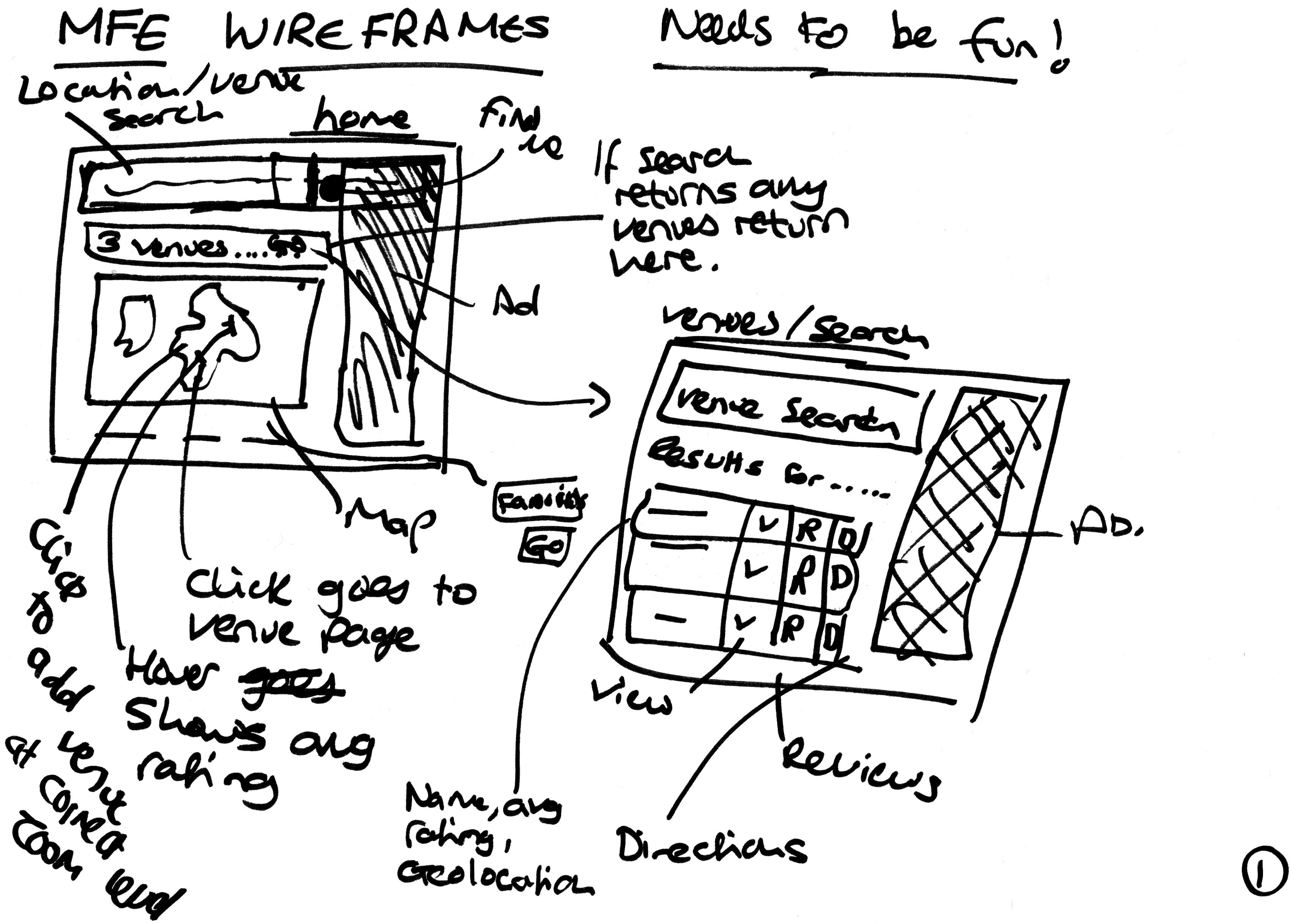
    The initial design phase has to exclude all detail. To force this approach I took a Sharpie pen and some blank pieces of paper. Firstly I identified my main user paths. Luckily for MFE, there are only 2 of them.

    1. I need to find a venue for my breakfast
    2. I’ve just finished my breakfast and I would like to add a review

    Both of these paths need to be achieved in as few amount of steps as possible and work on both mobile and desktop devices. Here are some of the initial sketches.

    MFE Wireframe
    MFE Initial Design

    Ok, I’m unlikely to win any art competitions but by roughly sketching out ideas I managed to get a much better idea of what the flow of the site needed to be.

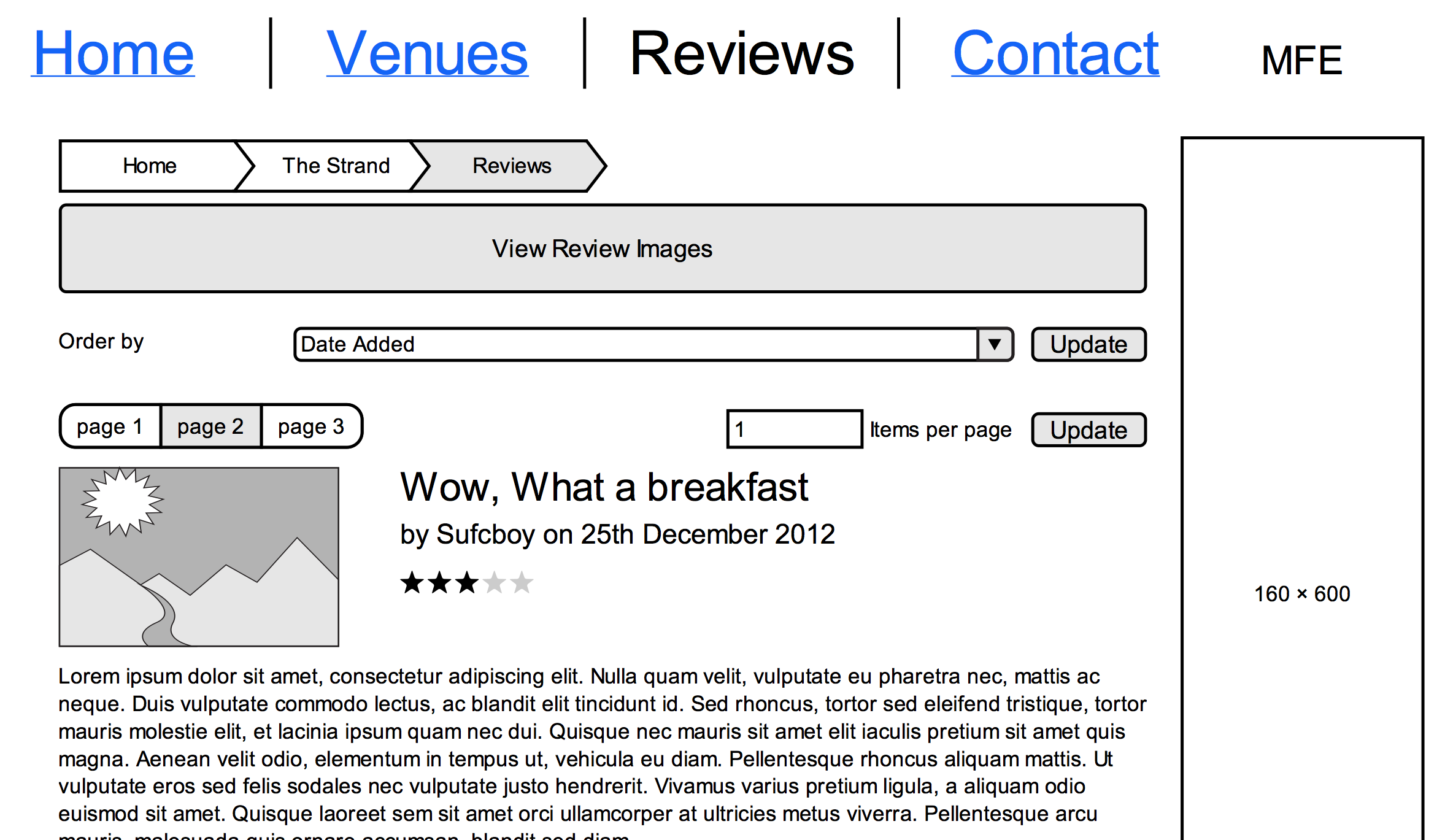
    Once I was happy I created a digital version of the designs and flow to make it easier to share and reference. I used Mockingbird, which is a very easy-to-use wire-framing tool and is free for 1 project.

    MFE Digital Wireframe
    MFE Digital Wireframe

    Once transposed I exported it to a PDF which I could then share with others and also use as a constant reference for the ultimate goal of the project.

    What Next

    In the next post, we’ll look at how we are going to manage this project